 Front Deskby Marketing MIX
MMIX Front Desk · for law firms, clinics & service companies
Website, bookings, clients. One desk.
We build your website, put online booking on it and send every request into one client inbox. Set up for you in 7 working days, in the languages your clients speak.
Marketing MIX, building for small businesses since 2012. Payment at the start of each stage, everything agreed in writing.

01 · What's inside
In the box.
Everything a client touches between «I found you» and «see you on Tuesday», set up by our team and connected end to end. You get the keys, the logins and one person to write to.
Website
A fast site on Next.js under your domain: one landing page or a multi-page site with services, team, prices and contacts. Built for phones first, with a clear «book» button on every screen.
Built by MMIXOnline booking
Two ways, your choice. Clients pick a time on your site and the request lands in your inbox for you to confirm. Or they book themselves in your own Square Appointments, Calendly or Cal.com calendar, placed inside your pages — we set services, durations and hours with you, and confirmations go out from that tool.
Your calendar, our setupClient inbox (CRM)
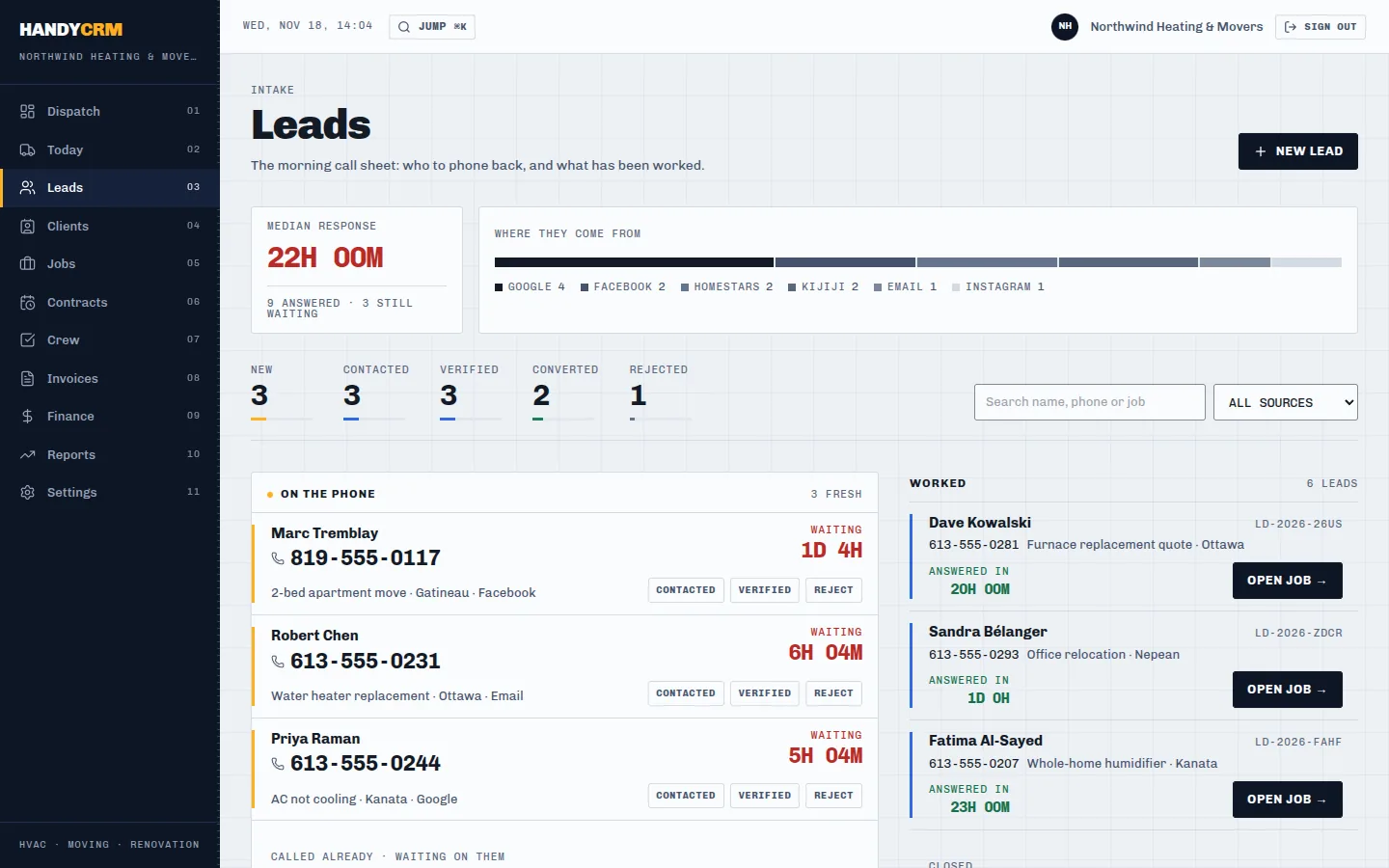
Every request from the site form and the quiz lands in one inbox with its source; Meta lead forms and email can be connected too. Each person gets a card with history, and the team sees who was answered and who is still waiting.
Connected on day oneRequest form & quiz
A short form that takes a phone in any format, an email or a messenger handle — and, if you want it, a 4–6 step quiz that asks the qualifying questions before the first reply.
Written with youLanguages
The site in the languages of your clients — English, French, Spanish, Ukrainian, Russian — with a switcher and proper page versions for search engines.
Per languageMessenger buttons
WhatsApp and Telegram buttons that open a chat with a ready first message, so a client can write to you in two taps.
Your numbersAnalytics
Microsoft Clarity shows where visitors click and scroll; Google Analytics 4 counts every request and every click on «book». You see which page and which ad bring clients.
Your accountsHosting & domain
Hosting and domain renewal for the first year are part of the price. From the second year — 100 € a year, with SSL and backups.
Year one included02 · Live demo
Pick a time. Watch it land.
This is the route of one client: your site, a free slot, your inbox. Pick a time in the booking form — the request appears in the inbox next to it, ready for your team to confirm.
- 01Site
- 02Booking
- 03Inbox
- 04Answer
- 05Visit
Request sent ✓
This demo runs in your browser with sample data and sends nothing. On your site you choose: time requests that land in your inbox like this, or self-booking in your own Square, Calendly or Cal.com calendar.
03 · Real screens
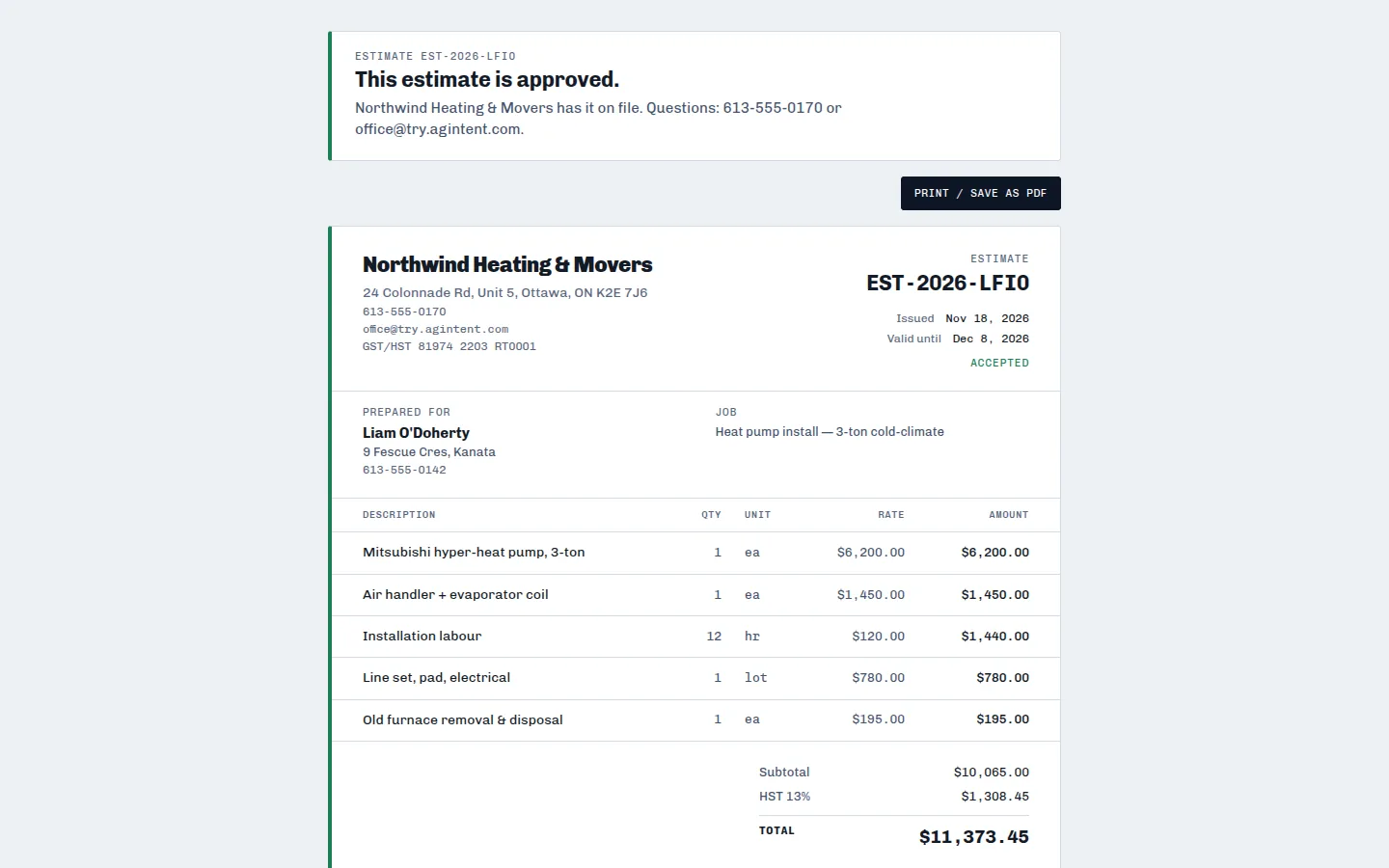
The inbox, for real.
Screens of the client inbox we connect, taken from its demo workspace of a service company. Your version carries your name and your services.

04 · Made for
Your kind of front desk.
Same box, tuned to how your clients choose and book. International entrepreneurs often serve clients in two or three languages — that is built in.

Law firms
Consultations booked straight from the page
One page per practice area, each with its own booking calendar and intake form.
- Practice pages in English and Spanish, French or Ukrainian
- Consultation booking through your Square or Calendly calendar
- Intake form with the questions you ask on the first call

Clinics & wellness
Services, prices and free times on one screen
Patients see what you treat, how long it takes and when you are free — and book without waiting on the phone.
- Service list with durations and prices
- Booking per practitioner and per service
- Clarity shows where patients hesitate before booking

Service companies
From request to signed quote to paid invoice
Movers, HVAC, renovation, cleaning: the inbox grows into a full job board with crews, quotes and invoices.
- Quiz that asks size, address and date before you call back
- Meta lead forms straight into the inbox
- Job schedule, crew view, quotes with e-signature, invoices
05 · How it goes
Seven working days.
For a landing: the clock starts when we have your texts, logo and access to your booking tool. A multi-page site takes 7–10 working days.
Brief in writing
You fill a short brief: services, prices, languages, working hours. We list what we need from you.
Pages & booking
Design and texts of the pages, booking calendar set up with your services and hours.
Inbox & analytics
Forms, quiz and lead forms connected to the inbox; Clarity and GA4 counting every request.
Live on your domain
Test requests end to end, a short written guide for your team, and the site goes live.
How payment works. You pay at the start of each stage, the work starts once the stage is paid. Everything is agreed in writing — brief, edits and acceptance.
06 · Pricing
Pick your box.
One-time price for the build. Hosting and domain for the first year are included; from the second year — 100 € a year.
Landing
One strong page for a business that needs to start taking bookings.
one-time
Hosting year one included
- One-page site under your domain
- Booking calendar on the page
- Request form → client inbox
- WhatsApp / Telegram buttons
- Microsoft Clarity + GA4
Website
A full site for a firm, clinic or company with several services.
one-time
Hosting year one included
- Multi-page site: services, team, prices, contacts
- Booking per service or per person
- Client inbox with every source connected
- Lead quiz
- Second language version
- Microsoft Clarity + GA4
Website + Ads
The site plus a steady flow of requests from Facebook and Instagram.
ads management
On top of Landing or Website
- Ad account, quiz and campaign launch
- Meta lead forms into the inbox
- Monthly review: cost per request
- Ad budget paid by you directly to Meta
Prices in Canadian dollars; HST is added for businesses in Canada. Extra language versions, more pages or a custom booking flow are quoted in writing before the work starts.
07 · Questions
Before you ask.
The questions owners send us most often. Anything else — write it in the request form.
I already use Square, Calendly or Cal.com. Can I keep it?
Yes. We put your existing booking calendar on the new pages and set the services and hours with you. Your clients, payments and reminders stay in your account.
What do you need from me to start?
Your texts or a short description of services, prices, logo and photos if you have them, access to the domain and to your booking tool. We send a written list on day one.
Who owns the site and the data?
You. The domain is registered to you, the booking account is yours, and requests in the inbox belong to your business. If you leave, we hand over the files and the access.
Can the site be in two or three languages?
Yes. Each language gets its own page version with a switcher. The Website plan includes a second language; more languages are quoted in writing.
What happens after the first year?
Hosting and domain renewal cost 100 € a year. Edits after launch are agreed and priced in writing before we start them.
Do you also bring clients?
Yes, with the Website + Ads plan: we launch and manage Facebook and Instagram ads with a quiz for 750 CAD a month. The ad budget goes from you straight to Meta.
08 · Request
Get your Front Desk.
Tell us about your business and how to reach you. We reply in writing with the plan, the price for your case and the list of what we need from you.
Request received ✓
Thank you. We will write back with the plan and the price for your case. Your request number: .